# Aniwatch API
A free RESTful API serving anime information from
hianime.to
[](https://github.com/ghoshRitesh12/aniwatch-api/actions/workflows/codeql-analysis.yml)
[](https://github.com/ghoshRitesh12/aniwatch-api/actions/workflows/docker-build.yml)
[](https://github.com/ghoshRitesh12/aniwatch-api/actions/workflows/test.yml)
[](https://github.com/ghoshRitesh12/aniwatch-api/blob/main/LICENSE)
[](https://github.com/ghoshRitesh12/aniwatch-api/stargazers)
[](https://github.com/ghoshRitesh12/aniwatch-api/network/members)
[](https://github.com/ghoshRitesh12/aniwatch-api/issues?q=is%3Aissue+is%3Aopen+)
[](https://github.com/ghoshRitesh12/aniwatch-api/releases/latest)
> [!NOTE]
> The API has shifted to version 2, thereby naturally introducing breaking changes. If you'd want to use the previous version of this API, then refer to [the last stable version](https://github.com/ghoshRitesh12/aniwatch-api/tree/v1.40.0).
> [!IMPORTANT]
>
> 1. [https://api-aniwatch.onrender.com](https://api-aniwatch.onrender.com/) is only meant to demo the API and has rate-limiting enabled to minimize bandwidth consumption. It is recommended to deploy your own instance for personal use by customizing the API as you need it to be.
> 2. This API is just an unofficial API for [hianime.to](https://hianime.to) and is in no other way officially related to the same.
> 3. The content that this API provides is not mine, nor is it hosted by me. These belong to their respective owners. This API just demonstrates how to build an API that scrapes websites and uses their content.
## Table of Contents
- [Installation](#installation)
- [Local](#local)
- [Docker](#docker)
- [Configuration](#️configuration)
- [Custom HTTP Headers](#custom-http-headers)
- [Environment Variables](#environment-variables)
- [Host your instance](#host-your-instance)
- [Vercel](#vercel)
- [Render](#render)
- [Documentation](#documentation)
- [GET Anime Home Page](#get-anime-home-page)
- [GET Anime About Info](#get-anime-about-info)
- [GET Search Results](#get-search-results)
- [GET Search Suggestions](#get-search-suggestions)
- [GET Producer Animes](#get-producer-animes)
- [GET Genre Animes](#get-genre-animes)
- [GET Category Animes](#get-category-animes)
- [GET Estimated Schedules](#get-estimated-schedules)
- [GET Anime Episodes](#get-anime-episodes)
- [GET Anime Episode Servers](#get-anime-episode-servers)
- [GET Anime Episode Streaming Links](#get-anime-episode-streaming-links)
- [Development](#development)
- [Contributors](#contributors)
- [Thanks](#thanks)
- [Support](#support)
- [License](#license)
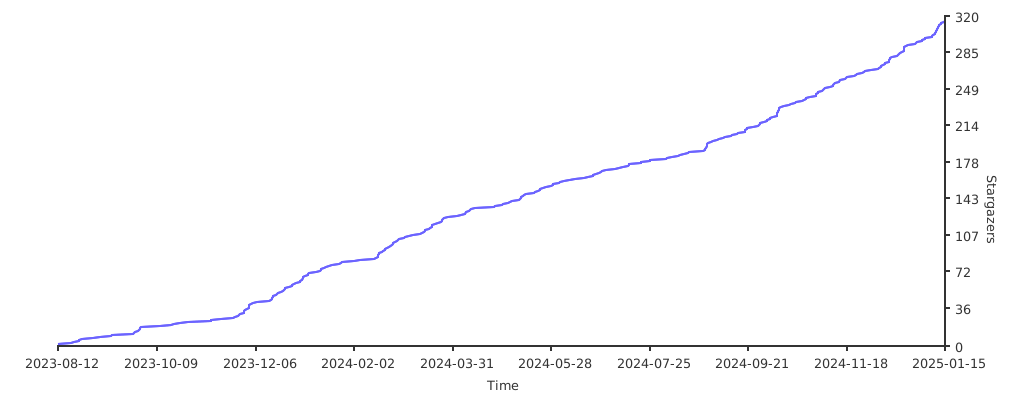
- [Star History](#star-history)
## 💻 Installation
### Local
1. Clone the repository and move into the directory.
```bash
git clone https://github.com/ghoshRitesh12/aniwatch-api.git
cd aniwatch-api
```
2. Install all the dependencies.
```bash
npm i #or yarn install or pnpm i
```
3. Start the server!
```bash
npm start #or yarn start or pnpm start
```
Now the server should be running on [http://localhost:4000](http://localhost:4000)
### Docker
The Docker image is available at [The GitHub Container Registry](https://github.com/ghoshRitesh12/aniwatch-api/pkgs/container/aniwatch).
Run the following commands to pull and run the docker image.
```bash
docker run -d --name aniwatch-api -p 4000:4000 ghcr.io/ghoshritesh12/aniwatch
```
The above command will start the server on port 4000. You can access the server at [http://localhost:4000](http://localhost:4000), and you can also change the port by changing the `-p` option to `-p :4000`.
The `-d` flag runs the container in detached mode, and the `--name` flag is used to name the container that's about to run.
## ⚙️ Configuration
### Custom HTTP Headers
Currently this API supports parsing of only one custom header, and more may be implemented in the future to accommodate varying needs.
- `X-ANIWATCH-CACHE-EXPIRY`: this custom header is used to specify the cache expiration duration in **seconds** (defaults to 60 if the header is missing). The `ANIWATCH_API_REDIS_CONN_URL` env is required for this custom header to function as intended; otherwise, there's no point in setting this custom header.
### Environment Variables
More info can be found in the [`.env.example`](https://github.com/ghoshRitesh12/aniwatch-api/blob/main/.env.example) file, where envs' having a value that is contained within `<` `>` angled brackets are just examples and should be replaced with relevant ones.
- `ANIWATCH_API_PORT`: port number of the aniwatch API.
- `ANIWATCH_API_WINDOW_MS`: duration to track requests for rate limiting (in milliseconds).
- `ANIWATCH_API_MAX_REQS`: maximum number of requests in the `ANIWATCH_API_WINDOW_MS` time period.
- `ANIWATCH_API_CORS_ALLOWED_ORIGINS`: allowed origins, separated by commas and no spaces in between.
- `ANIWATCH_API_VERCEL_DEPLOYMENT`: required for distinguishing Vercel deployment from other ones; set it to true or any other non-zero value.
- `ANIWATCH_API_HOSTNAME`: set this to your api instance's hostname to enable rate limiting, don't have this value if you don't wish to rate limit.
- `ANIWATCH_API_REDIS_CONN_URL`: this env is optional by default and can be set to utilize Redis caching functionality. It has to be a valid connection URL; otherwise, the Redis client can throw unexpected errors.
## ⛅ Host your instance
> [!CAUTION]
>
> For personal deployments:
>
> - If you want to have rate limiting in your application, then set the `ANIWATCH_API_HOSTNAME` env to your deployed instance's hostname; otherwise, don't set or have this env at all. If you set this env to an incorrect value, you may face other issues.
> - It's optional by default, but if you want to have endpoint response caching functionality, then set the `ANIWATCH_API_REDIS_CONN_URL` env to a valid Redis connection URL. If the connection URL is invalid, the Redis client can throw unexpected errors.
> - Remove the if block from the [`server.ts`](https://github.com/ghoshRitesh12/aniwatch-api/blob/main/src/server.ts) file, spanning from lines [71](https://github.com/ghoshRitesh12/aniwatch-api/blob/main/src/server.ts#L71) to [83](https://github.com/ghoshRitesh12/aniwatch-api/blob/main/src/server.ts#L83).
### Vercel
Deploy your own instance of Aniwatch API on Vercel.
[](https://vercel.com/new/clone?repository-url=https://github.com/ghoshRitesh12/aniwatch-api)
> [!NOTE]
>
> When deploying to vercel, set an env named `ANIWATCH_API_VERCEL_DEPLOYMENT` to `true` or any non-zero value, but this env must be present.
### Render
Deploy your own instance of Aniwatch API on Render.
[](https://render.com/deploy?repo=https://github.com/ghoshRitesh12/aniwatch-api)
## 📚 Documentation
The endpoints exposed by the api are listed below with examples that uses the [Fetch API](https://developer.mozilla.org/en-US/docs/Web/API/Fetch_API), but you can use any http library.
### `GET` Anime Home Page
#### Endpoint
```bash
/api/v2/hianime/home
```
#### Request sample
```javascript
const resp = await fetch("/api/v2/hianime/home");
const data = await resp.json();
console.log(data);
```
#### Response Schema
```javascript
{
success: true,
data: {
genres: ["Action", "Cars", "Adventure", ...],
latestEpisodeAnimes: [
{
id: string,
name: string,
poster: string,
type: string,
episodes: {
sub: number,
dub: number,
}
},
{...},
],
spotlightAnimes: [
{
id: string,
name: string,
jname: string,
poster: string,
description: string,
rank: number,
otherInfo: string[],
episodes: {
sub: number,
dub: number,
},
},
{...},
],
top10Animes: {
today: [
{
episodes: {
sub: number,
dub: number,
},
id: string,
name: string,
poster: string,
rank: number
},
{...},
],
month: [...],
week: [...]
},
topAiringAnimes: [
{
id: string,
name: string,
jname: string,
poster: string,
},
{...},
],
topUpcomingAnimes: [
{
id: string,
name: string,
poster: string,
duration: string,
type: string,
rating: string,
episodes: {
sub: number,
dub: number,
}
},
{...},
],
trendingAnimes: [
{
id: string,
name: string,
poster: string,
rank: number,
},
{...},
],
mostPopularAnimes: [
{
id: string,
name: string,
poster: string,
type: string,
episodes: {
sub: number,
dub: number,
}
},
{...},
],
mostFavoriteAnimes: [
{
id: string,
name: string,
poster: string,
type: string,
episodes: {
sub: number,
dub: number,
}
},
{...},
],
latestCompletedAnimes: [
{
id: string,
name: string,
poster: string,
type: string,
episodes: {
sub: number,
dub: number,
}
},
{...},
],
}
}
```
[🔼 Back to Top](#table-of-contents)
### `GET` Anime About Info
#### Endpoint
```sh
/api/v2/hianime/anime/{animeId}
```
#### Query Parameters
| Parameter | Type | Description | Required? | Default |
| :-------: | :----: | :----------------------------------: | :-------: | :-----: |
| `animeId` | string | The unique anime id (in kebab case). | Yes | -- |
#### Request sample
```javascript
const resp = await fetch("/api/v2/hianime/anime/attack-on-titan-112");
const data = await resp.json();
console.log(data);
```
#### Response Schema
```javascript
{
success: true,
data: {
anime: [
info: {
id: string,
name: string,
poster: string,
description: string,
stats: {
rating: string,
quality: string,
episodes: {
sub: number,
dub: number
},
type: string,
duration: string
},
promotionalVideos: [
{
title: string | undefined,
source: string | undefined,
thumbnail: string | undefined
},
{...},
],
characterVoiceActor: [
{
character: {
id: string,
poster: string,
name: string,
cast: string
},
voiceActor: {
id: string,
poster: string,
name: string,
cast: string
}
},
{...},
]
}
moreInfo: {
aired: string,
genres: ["Action", "Mystery", ...],
status: string,
studios: string,
duration: string
...
}
],
mostPopularAnimes: [
{
episodes: {
sub: number,
dub: number,
},
id: string,
jname: string,
name: string,
poster: string,
type: string
},
{...},
],
recommendedAnimes: [
{
id: string,
name: string,
poster: string,
duration: string,
type: string,
rating: string,
episodes: {
sub: number,
dub: number,
}
},
{...},
],
relatedAnimes: [
{
id: string,
name: string,
poster: string,
duration: string,
type: string,
rating: string,
episodes: {
sub: number,
dub: number,
}
},
{...},
],
seasons: [
{
id: string,
name: string,
title: string,
poster: string,
isCurrent: boolean
},
{...}
]
}
}
```
[🔼 Back to Top](#table-of-contents)
### `GET` Search Results
#### Endpoint
```sh
# basic example
/api/v2/hianime/search?q={query}&page={page}
# advanced example
/api/v2/hianime/search?q={query}&page={page}&genres={genres}&type={type}&sort={sort}&season={season}&language={sub_or_dub}&status={status}&rated={rating}&start_date={yyyy-mm-dd}&end_date={yyyy-mm-dd}&score={score}
```
#### Query Parameters
| Parameter | Type | Description | Required? | Default |
| :----------: | :----: | :---------------------------------------------------------------: | :-------: | :-----: |
| `q` | string | The search query, i.e. the title of the item you are looking for. | Yes | -- |
| `page` | number | The page number of the result. | No | `1` |
| `type` | string | Type of the anime. eg: `movie` | No | -- |
| `status` | string | Status of the anime. eg: `finished-airing` | No | -- |
| `rated` | string | Rating of the anime. eg: `r+` or `pg-13` | No | -- |
| `score` | string | Score of the anime. eg: `good` or `very-good` | No | -- |
| `season` | string | Season of the aired anime. eg: `spring` | No | -- |
| `language` | string | Language category of the anime. eg: `sub` or `sub-&-dub` | No | -- |
| `start_date` | string | Start date of the anime(yyyy-mm-dd). eg: `2014-10-2` | No | -- |
| `end_date` | string | End date of the anime(yyyy-mm-dd). eg: `2010-12-4` | No | -- |
| `sort` | string | Order of sorting the anime result. eg: `recently-added` | No | -- |
| `genres` | string | Genre of the anime, separated by commas. eg: `isekai,shounen` | No | -- |
> [!TIP]
> For both `start_date` and `end_date`, year must be mentioned. If you wanna omit date or month specify `0` instead.
> Eg: omitting date -> 2014-10-0, omitting month -> 2014-0-12, omitting both -> 2014-0-0
#### Request sample
```javascript
// basic example
const resp = await fetch("/api/v2/hianime/search?q=titan&page=1");
const data = await resp.json();
console.log(data);
// advanced example
const resp = await fetch(
"/api/v2/hianime/search?q=girls&genres=action,adventure&type=movie&sort=score&season=spring&language=dub&status=finished-airing&rated=pg-13&start_date=2014-0-0&score=good"
);
const data = await resp.json();
console.log(data);
```
#### Response Schema
```javascript
{
success: true,
data: {
animes: [
{
id: string,
name: string,
poster: string,
duration: string,
type: string,
rating: string,
episodes: {
sub: number,
dub: number,
}
},
{...},
],
mostPopularAnimes: [
{
episodes: {
sub: number,
dub: number,
},
id: string,
jname: string,
name: string,
poster: string,
type: string
},
{...},
],
currentPage: 1,
totalPages: 1,
hasNextPage: false,
searchQuery: string,
searchFilters: {
[filter_name]: [filter_value]
...
}
}
}
```
[🔼 Back to Top](#table-of-contents)
### `GET` Search Suggestions
#### Endpoint
```sh
/api/v2/hianime/search/suggestion?q={query}
```
#### Query Parameters
| Parameter | Type | Description | Required? | Default |
| :-------: | :----: | :--------------------------: | :-------: | :-----: |
| `q` | string | The search suggestion query. | Yes | -- |
#### Request sample
```javascript
const resp = await fetch("/api/v2/hianime/search/suggestion?q=monster");
const data = await resp.json();
console.log(data);
```
#### Response Schema
```javascript
{
success: true,
data: {
suggestions: [
{
id: string,
name: string,
poster: string,
jname: string,
moreInfo: ["Jan 21, 2022", "Movie", "17m"]
},
{...},
]
}
}
```
[🔼 Back to Top](#table-of-contents)
### `GET` Producer Animes
#### Endpoint
```sh
/api/v2/hianime/producer/{name}?page={page}
```
#### Path Parameters
| Parameter | Type | Description | Required? | Default |
| :-------: | :----: | :-----------------------------------------: | :-------: | :-----: |
| `name` | string | The name of anime producer (in kebab case). | Yes | -- |
#### Query Parameters
| Parameter | Type | Description | Required? | Default |
| :-------: | :----: | :----------------------------: | :-------: | :-----: |
| `page` | number | The page number of the result. | No | `1` |
#### Request sample
```javascript
const resp = await fetch("/api/v2/hianime/producer/toei-animation?page=2");
const data = await resp.json();
console.log(data);
```
#### Response Schema
```javascript
{
success: true,
data: {
producerName: "Toei Animation Anime",
animes: [
{
id: string,
name: string,
poster: string,
duration: string,
type: string,
rating: string,
episodes: {
sub: number,
dub: number,
}
},
{...},
],
top10Animes: {
today: [
{
episodes: {
sub: number,
dub: number,
},
id: string,
name: string,
poster: string,
rank: number
},
{...},
],
month: [...],
week: [...]
},
topAiringAnimes: [
{
episodes: {
sub: number,
dub: number,
},
id: string,
jname: string,
name: string,
poster: string,
type: string
},
{...},
],
currentPage: 2,
totalPages: 11,
hasNextPage: true
}
}
```
[🔼 Back to Top](#table-of-contents)
### `GET` Genre Animes
#### Endpoint
```sh
/api/v2/hianime/genre/{name}?page={page}
```
#### Path Parameters
| Parameter | Type | Description | Required? | Default |
| :-------: | :----: | :--------------------------------------: | :-------: | :-----: |
| `name` | string | The name of anime genre (in kebab case). | Yes | -- |
#### Query Parameters
| Parameter | Type | Description | Required? | Default |
| :-------: | :----: | :----------------------------: | :-------: | :-----: |
| `page` | number | The page number of the result. | No | `1` |
#### Request sample
```javascript
const resp = await fetch("/api/v2/hianime/genre/shounen?page=2");
const data = await resp.json();
console.log(data);
```
#### Response Schema
```javascript
{
success: true,
data: {
genreName: "Shounen Anime",
animes: [
{
id: string,
name: string,
poster: string,
duration: string,
type: string,
rating: string,
episodes: {
sub: number,
dub: number,
}
},
{...},
],
genres: ["Action", "Cars", "Adventure", ...],
topAiringAnimes: [
{
episodes: {
sub: number,
dub: number,
},
id: string,
jname: string,
name: string,
poster: string,
type: string
},
{...},
],
currentPage: 2,
totalPages: 38,
hasNextPage: true
}
}
```
[🔼 Back to Top](#table-of-contents)
### `GET` Category Animes
#### Endpoint
```sh
/api/v2/hianime/category/{name}?page={page}
```
#### Path Parameters
| Parameter | Type | Description | Required? | Default |
| :--------: | :----: | :--------------------: | :-------: | :-----: |
| `category` | string | The category of anime. | Yes | -- |
#### Query Parameters
| Parameter | Type | Description | Required? | Default |
| :-------: | :----: | :----------------------------: | :-------: | :-----: |
| `page` | number | The page number of the result. | No | `1` |
#### Request sample
```javascript
// categories -> "most-favorite", "most-popular", "subbed-anime", "dubbed-anime", "recently-updated", "recently-added", "top-upcoming", "top-airing", "movie", "special", "ova", "ona", "tv", "completed"
const resp = await fetch("/api/v2/hianime/category/tv?page=2");
const data = await resp.json();
console.log(data);
```
#### Response Schema
```javascript
{
success: true,
data: {
category: "TV Series Anime",
animes: [
{
id: string,
name: string,
poster: string,
duration: string,
type: string,
rating: string,
episodes: {
sub: number,
dub: number,
}
},
{...},
],
genres: ["Action", "Cars", "Adventure", ...],
top10Animes: {
today: [
{
episodes: {
sub: number,
dub: number,
},
id: string,
name: string,
poster: string,
rank: number
},
{...},
],
month: [...],
week: [...]
},
currentPage: 2,
totalPages: 100,
hasNextPage: true
}
}
```
[🔼 Back to Top](#table-of-contents)
### `GET` Estimated Schedules
#### Endpoint
```sh
/api/v2/hianime/schedule?date={date}
```
#### Query Parameters
| Parameter | Type | Description | Required? | Default |
| :-----------------: | :----: | :------------------------------------------------------------------: | :-------: | :-----: |
| `date (yyyy-mm-dd)` | string | The date of the desired schedule. (months & days must have 2 digits) | Yes | -- |
#### Request sample
```javascript
const resp = await fetch("/api/v2/hianime/schedule?date=2024-06-09");
const data = await resp.json();
console.log(data);
```
#### Response Schema
```javascript
{
success: true,
data: {
scheduledAnimes: [
{
id: string,
time: string, // 24 hours format
name: string,
jname: string,
airingTimestamp: number,
secondsUntilAiring: number
},
{...}
]
}
}
```
[🔼 Back to Top](#table-of-contents)
### `GET` Anime Episodes
#### Endpoint
```sh
/api/v2/hianime/anime/{animeId}/episodes
```
#### Path Parameters
| Parameter | Type | Description | Required? | Default |
| :-------: | :----: | :------------------: | :-------: | :-----: |
| `animeId` | string | The unique anime id. | Yes | -- |
#### Request sample
```javascript
const resp = await fetch("/api/v2/hianime/anime/steinsgate-3/episodes");
const data = await resp.json();
console.log(data);
```
#### Response Schema
```javascript
{
success: true,
data: {
totalEpisodes: 24,
episodes: [
{
number: 1,
title: "Turning Point",
episodeId: "steinsgate-3?ep=213"
isFiller: false,
},
{...}
]
}
}
```
[🔼 Back to Top](#table-of-contents)
### `GET` Anime Episode Servers
#### Endpoint
```sh
/api/v2/hianime/episode/servers?animeEpisodeId={id}
```
#### Query Parameters
| Parameter | Type | Description | Required? | Default |
| :--------------: | :----: | :--------------------------: | :-------: | :-----: |
| `animeEpisodeId` | string | The unique anime episode id. | Yes | -- |
#### Request sample
```javascript
const resp = await fetch(
"/api/v2/hianime/episode/servers?animeEpisodeId=steinsgate-0-92?ep=2055"
);
const data = await resp.json();
console.log(data);
```
#### Response Schema
```javascript
{
success: true,
data: {
episodeId: "steinsgate-0-92?ep=2055",
episodeNo: 5,
sub: [
{
serverId: 4,
serverName: "vidstreaming",
},
{...}
],
dub: [
{
serverId: 1,
serverName: "megacloud",
},
{...}
],
raw: [
{
serverId: 1,
serverName: "megacloud",
},
{...}
]
}
}
```
[🔼 Back to Top](#table-of-contents)
### `GET` Anime Episode Streaming Links
#### Endpoint
```sh
/api/v2/hianime/episode/sources?animeEpisodeId={id}?server={server}&category={dub || sub || raw}
```
#### Query Parameters
| Parameter | Type | Description | Required? | Default |
| :--------------: | :----: | :--------------------------------------------------: | :-------: | :------: |
| `animeEpisodeId` | string | The unique anime episode id. | Yes | -- |
| `server` | string | The name of the server. | No | `"hd-1"` |
| `category` | string | The category of the episode ('sub', 'dub' or 'raw'). | No | `"sub"` |
#### Request sample
```javascript
const resp = await fetch(
"/api/v2/hianime/episode/sources?animeEpisodeId=steinsgate-3?ep=230&server=hd-1&category=dub"
);
const data = await resp.json();
console.log(data);
```
#### Response Schema
```javascript
{
success: true,
data: {
headers: {
Referer: string,
"User-Agent": string,
...
},
sources: [
{
url: string, // .m3u8 hls streaming file
isM3U8: boolean,
quality?: string,
},
{...}
],
subtitles: [
{
lang: "English",
url: string, // .vtt subtitle file
},
{...}
],
anilistID: number | null,
malID: number | null
}
}
```
[🔼 Back to Top](#table-of-contents)
## 👨💻 Development
Pull requests and stars are always welcome. If you encounter any bug or want to add a new feature to this api, consider creating a new [issue](https://github.com/ghoshRitesh12/aniwatch-api/issues). If you wish to contribute to this project, read the [CONTRIBUTING.md](https://github.com/ghoshRitesh12/aniwatch-api/blob/main/CONTRIBUTING.md) file.
## ✨ Contributors
Thanks to the following people for keeping this project alive and relevant.
[](https://github.com/ghoshRitesh12/aniwatch-api/graphs/contributors)
## 🤝 Thanks
- [consumet.ts](https://github.com/consumet/consumet.ts)
- [api.consumet.org](https://github.com/consumet/api.consumet.org)
## 🙌 Support
Don't forget to leave a star 🌟. You can also follow me on X (Twitter) [@riteshgsh](https://x.com/riteshgsh).
## 📜 License
This project is licensed under the [MIT License](https://opensource.org/license/mit/) - see the [LICENSE](https://github.com/ghoshRitesh12/aniwatch-api/blob/main/LICENSE) file for more details.